.png)

Learning Center


2. Inventory File Preparation
Please follow the recommendations below to ensure seamless transfer of your data to SYTNHIA™.
Data
- A custom inventory may only be uploaded as a CSV or SD file
- The file should only have one column with structures, either in SMILES strings (CSV) or mol format (SD)
- Each compound will need a unique id, such as a catalog number, an inventory number, or any identifier exclusive to its structure
- You may also transfer up to 20 associated data fields for each compound
- All associated data on the inventory file will be transferred to our server as is
- Do not transfer confidential or sensitive data (e.g., full chemical name of proprietary compounds, assay data, etc.)
- Avoid dots and symbols in column headers, as they may create errors during file uploading
Structures
- Only one entry per structure is allowed, please consolidate duplicates if needed
- One unique identifier is required for each structure
- Do not leave salts, hydrates, or other co-substrates in the structure
- Do not include charged molecules
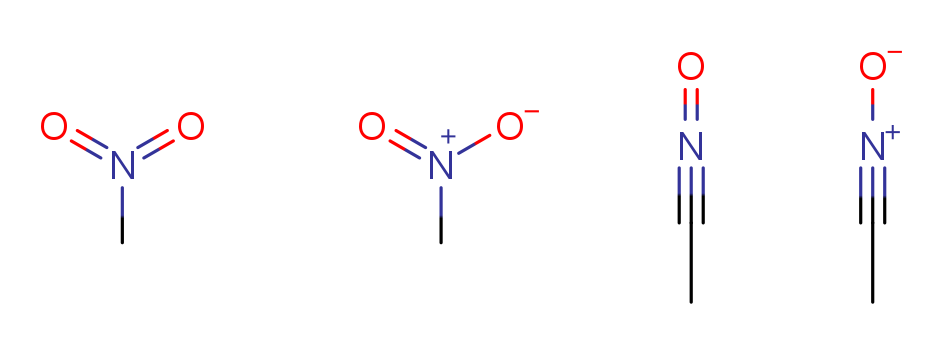
- Nitro, N-oxides, isocyanates or similar functional groups with multiple resonance forms may be depicted in any of the following forms